






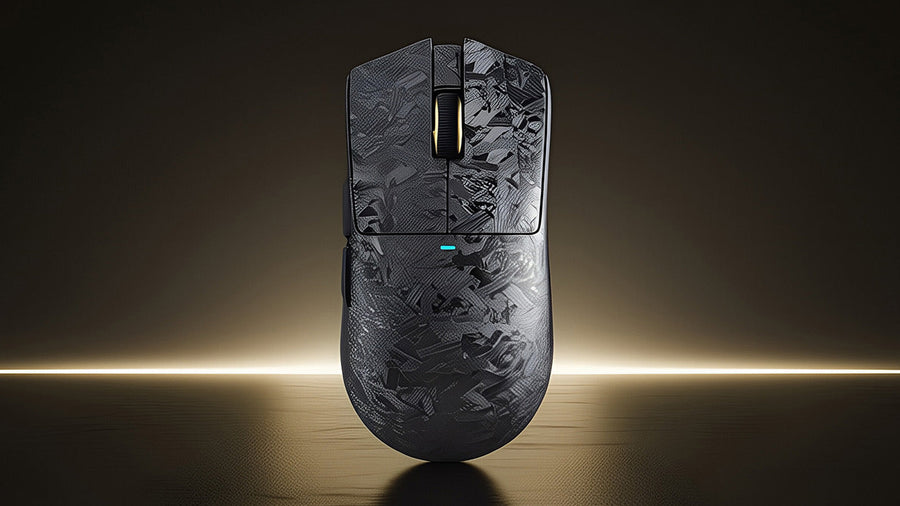
Le « clic » satisfaisant d’une souris est un élément incontournable de l’informatique, mais dans une bibliothèque silencieuse, un bureau ou une chambre partagée, ce bruit peut rapidement devenir gênant. Que vous soyez un joueur nocturne ou un professionnel travaillant dans un environnement calme, le bruit répétitif peut vous distraire et agacer votre entourage. Heureusement, vous n’avez pas à sacrifier la performance pour la tranquillité. Ce guide explique pourquoi les souris font du bruit et propose des solutions pratiques pour réduire le son, des modifications DIY à la mise à niveau vers une souris de jeu silencieuse.

Le bruit d’une souris de jeu est-il normal ?
Oui, le bruit de clic est tout à fait normal. Il est un sous-produit du commutateur mécanique présent dans presque toutes les souris d’ordinateur. À l’intérieur de la souris, sous le bouton, se trouve un micro-interrupteur minuscule. Lorsque vous appuyez, un ressort métallique entre en contact avec une autre plaque métallique pour fermer le circuit électrique. Cette action de claquement crée le retour tactile que vous ressentez et le clic audible que vous entendez.
Pour les joueurs, ce bruit est souvent un signe de qualité. Les souris haut de gamme utilisent des commutateurs nets et bruyants (comme Omron ou Kailh) car ils fournissent un retour clair. Ce retour confirme qu’une action a été enregistrée, ce qui est crucial dans les jeux rapides. Cependant, cette philosophie de conception privilégie la réponse tactile à la discrétion acoustique. Bien que normal, le volume peut varier considérablement selon le type de commutateur, le matériau de la coque de la souris et même la surface du bureau.
Souris de jeu filaire vs sans fil : laquelle est la plus bruyante ?
Il existe une idée reçue selon laquelle le type de connexion influence le niveau sonore. En réalité, qu’une souris soit filaire ou sans fil a presque aucun impact sur le volume du clic. Le son provient du mécanisme physique du commutateur, pas du mode de transmission des données. Une souris de jeu à clic silencieux peut être filaire ou sans fil.
Cependant, la qualité de fabrication associée à ces catégories peut jouer un rôle. Les souris sans fil ont souvent des coques plus denses pour loger les batteries, ce qui peut parfois atténuer l’écho creux d’un clic. À l’inverse, les souris filaires ultra-légères, souvent dotées de coques alvéolées, peuvent amplifier le son car il y a moins de matière pour absorber les vibrations. En fin de compte, c’est le commutateur qui détermine le volume, pas le câble. Si vous comparez deux souris avec les mêmes commutateurs, elles auront un son pratiquement identique, peu importe leur mode de connexion à votre PC.

Comment rendre le clic de la souris silencieux
Si vous adorez votre souris actuelle mais détestez le bruit, il existe quelques méthodes DIY pour atténuer le son sans acheter de nouveau matériel. Sachez que l’ouverture de votre souris annulera probablement la garantie.
Atténuation sonore interne
L’espace vide à l’intérieur de la coque de la souris agit comme une chambre de résonance, amplifiant le clic. Vous pouvez ouvrir la souris et placer de petits morceaux de mousse insonorisante ou du ruban adhésif épais à l’intérieur de la coque supérieure. Cela absorbe les vibrations avant qu’elles ne se transforment en bruit. Cela n’éliminera pas le claquement mécanique, mais réduira le « ping » aigu qui se propage à travers le plastique.
Lubrification du commutateur
Les passionnés de claviers mécaniques lubrifient souvent les commutateurs, et vous pouvez faire de même pour une souris. Appliquer une petite quantité de graisse diélectrique non conductrice sur le mécanisme interne du micro-interrupteur peut adoucir l’impact. Cela demande de la précision ; trop de graisse peut rendre le commutateur mou ou l’empêcher de fonctionner complètement.
Utiliser un tapis de bureau
Parfois, c’est le bureau lui-même qui amplifie le son. Une souris dure sur un bureau en bois dur transmet efficacement les vibrations. Utiliser un tapis de souris gaming épais et doux absorbe l’énergie de vos mouvements de main et l’impact du clic, réduisant le niveau sonore perçu dans la pièce.
Existe-t-il une souris qui ne fait pas de bruit de clic ?
Pour ceux qui veulent une solution garantie sans bricolage, le marché propose désormais des options silencieuses dédiées. Ces appareils remplacent le mécanisme de claquement standard par des commutateurs amortis. Ces commutateurs utilisent des tampons en caoutchouc pour adoucir les points de contact, réduisant le son de plus de 90 % tout en enregistrant toujours l’entrée.
Choisir la meilleure souris silencieuse dépend de vos besoins spécifiques. Vous voulez un équilibre entre silence et réactivité nécessaire pour le jeu. Par exemple, la souris de jeu sans fil ATTACK SHARK X2 est un excellent choix dans cette catégorie. Cet appareil propose une connexion Tri-Mode sans fil (2,4 GHz, Bluetooth 5.0 et USB-C filaire), ce qui le rend polyvalent pour toute configuration. Sa caractéristique phare est la technologie Silent Click, qui vous permet de jouer intensément sans déranger personne.
Contrairement aux souris silencieuses de bureau classiques qui accusent souvent un retard, l’ATTACK SHARK X2 conserve des performances de niveau gaming grâce à son capteur PixArt 3212. Elle dispose également d’une coque transparente ergonomique avec éclairage RGB, prouvant qu’une souris de jeu à clic silencieux peut être élégante et performante sur Windows comme sur MAC. Si vous cherchez la meilleure souris silencieuse qui passe aisément du travail de bureau aux raids nocturnes, ce modèle offre le parfait équilibre entre discrétion et satisfaction tactile.
FAQ
Les souris de jeu silencieuses donnent-elles une sensation molle ?
Les premiers modèles oui, mais les commutateurs silencieux modernes ont beaucoup progressé. Bien qu’ils n’aient pas le claquement net d’un commutateur mécanique traditionnel, les souris silencieuses de haute qualité offrent un retour tactile distinct pour savoir quand le bouton est activé.
Puis-je remplacer les commutateurs bruyants de ma souris actuelle ?
Oui, si vous êtes à l’aise avec la soudure. Vous pouvez dessouder les commutateurs bruyants existants (généralement à 3 broches) et souder des micro-interrupteurs silencieux, comme les Kailh Silent ou Huano Silent. Cela vous permet de garder la forme que vous préférez avec un fonctionnement silencieux.
Les souris silencieuses sont-elles plus chères ?
Pas forcément. La technologie des commutateurs silencieux n’est pas intrinsèquement plus coûteuse. Vous pouvez trouver une souris de jeu silencieuse à différents prix, des options économiques aux modèles haut de gamme. La différence de prix vient généralement de la qualité du capteur et des fonctionnalités sans fil, pas des commutateurs silencieux eux-mêmes.
Les commutateurs silencieux s’usent-ils plus vite ?
Autrefois, les commutateurs silencieux étaient conçus pour moins de clics (environ 3 à 5 millions). Cependant, les commutateurs silencieux modernes dans une souris de jeu à clic silencieux de qualité sont souvent garantis pour 20 millions de clics ou plus, ce qui les rend suffisamment durables pour des années de jeu.
Une souris silencieuse affectera-t-elle mes performances de jeu ?
Pour 99 % des joueurs, non. Le point d’activation et la latence sont comparables à ceux des souris standard. Seuls les joueurs professionnels d’e-sport qui s’appuient fortement sur le signal sonore d’un clic fort pour le rythme pourraient trouver la transition déstabilisante au début.



