


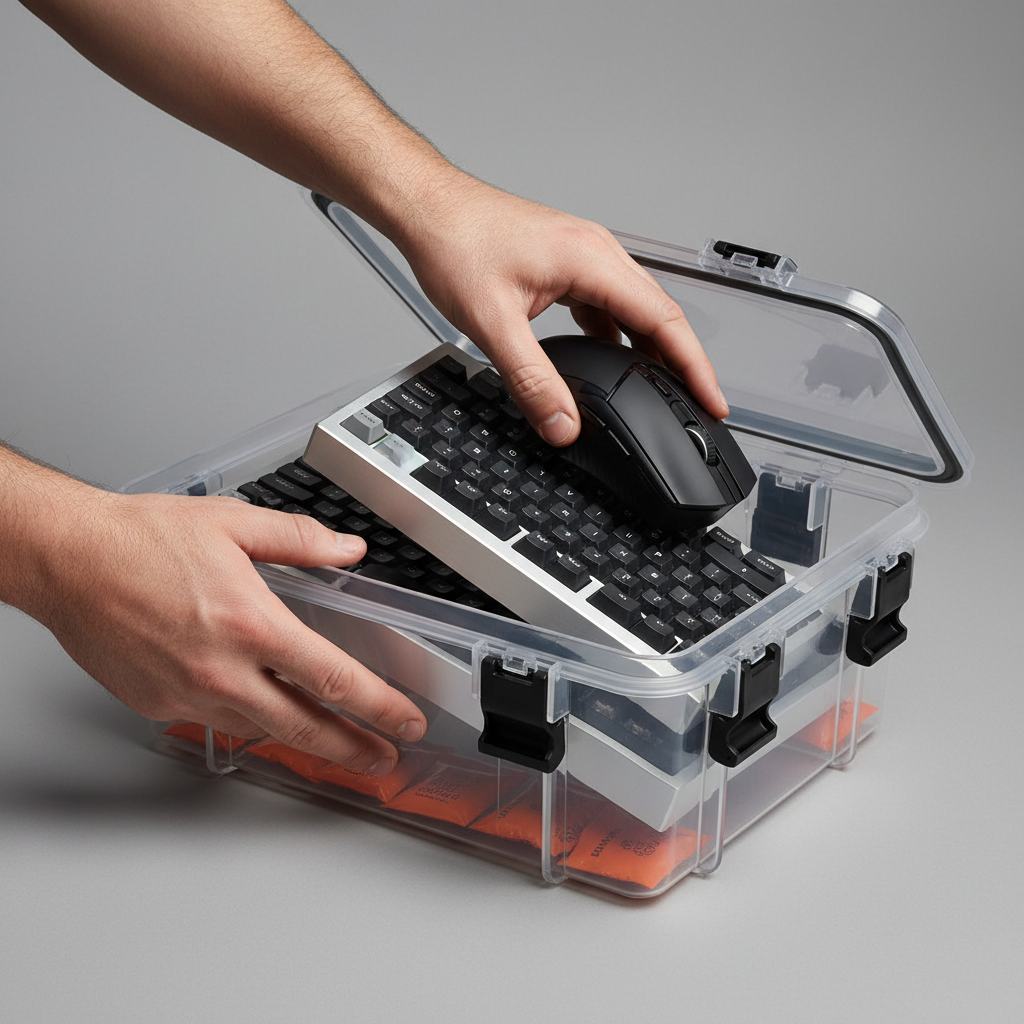
The Environmental Threat to Premium Metal Peripherals
The transition from mass-market plastic peripherals to premium, metal-constructed hardware represents a significant investment for enthusiasts. Whether it is a CNC-machined aluminum chassis, a brass internal weight, or stainless steel switch springs, these materials are chosen for their density, acoustics, and aesthetic longevity. However, metal is fundamentally reactive. When exposed to atmospheric moisture, the process of oxidation begins, potentially leading to surface pitting, discoloration of anodized finishes, and electrical failure within the PCB or switch contacts.
For collectors who rotate through multiple boards, long-term storage is not a passive activity. It is a preservation strategy. This article details the technical mechanisms of moisture-induced degradation and provides a data-driven framework for using silica gel desiccants and airtight containment systems to maintain hardware in factory-fresh condition.
The Chemistry of Oxidation in Gaming Hardware
Oxidation occurs when oxygen and moisture interact with a metal surface, leading to a loss of electrons and the formation of metal oxides. In the context of high-end peripherals, three primary categories of metal are at risk:
- Aluminum Alloys (6061/6063): While anodized aluminum finishes are highly resistant to corrosion due to a controlled oxide layer, deep scratches or poor-quality e-coatings can expose the raw metal to "white rust" (aluminum oxide).
- Copper and Brass: Often used for internal weights or switch leaves, these alloys are highly sensitive to humidity. They develop a green patina (verdigris) or dark tarnish when Relative Humidity (RH) exceeds 50%.
- Steel and Iron: Found in switch springs and fasteners. These are the most vulnerable, as iron oxide (red rust) can compromise the structural integrity and tactile consistency of a switch.
According to the EU RoHS Directive 2011/65/EU, the restriction of hazardous substances in electronics often means that modern solder and plating are more susceptible to environmental factors than legacy lead-based components. This necessitates a more aggressive approach to humidity control.
The Infrastructure of Preservation: Seal First, Dry Second
A common mistake among collectors is over-relying on desiccants while ignoring the container's integrity. Based on patterns observed in hardware preservation communities (not a controlled lab study), the critical failure point is usually the container seal, not the silica gel's capacity.
The Suction Test for Airtight Integrity
Generic plastic bins with "click-lock" lids are rarely airtight. They allow a constant exchange of humid ambient air, which quickly saturates any desiccant inside. Effective long-term storage requires containers equipped with:
- Compression Latches: These provide even pressure across the lid.
- Thick Silicone Gaskets: A compressible seal that fills microscopic gaps in the plastic molding.
The Practitioner's Suction Test: When closing a high-quality gasketed container, you should feel a slight resistance or hear a "whoosh" of air escaping as the gasket compresses. If the lid drops into place with no resistance, the seal is insufficient for multi-year storage in humid climates.
Calculating Desiccant Requirements
To prevent oxidation, the goal is to maintain an internal RH below 40%. The amount of silica gel required depends on the container's volume and the ambient environment.
- Standard Rule of Thumb: 50–100 grams of silica gel per cubic foot (approx. 28 liters) of container volume for moderate climates (40–60% RH).
- Humid/Coastal Rule: Double the amount (100–200 grams per cubic foot) if the storage area frequently exceeds 70% RH.
According to research into desiccant properties, 1 gram of silica gel is typically sufficient for a 1-liter container under stable conditions (SSE Enterprise - Silica Gel Requirements). However, for high-value metal peripherals, over-specifying the desiccant provides a safety margin against minor seal leaks.
The Science of Silica Gel Adsorption
Silica gel is not a "sponge" that soaks up liquid; it is a desiccant that uses adsorption. Water molecules stick to the vast internal surface area of the silica pores.
- Surface Area: Typical silica gel has a surface area of approximately 800 square meters per gram (Source: Streampeak Group). This allows it to hold up to 40% of its weight in water vapor.
- RH Dependency: The capacity of silica gel is directly tied to the surrounding air’s Relative Humidity. It is most efficient at high RH levels and becomes less effective as the air becomes drier (Source: Biology Insights).
Indicator vs. Bulk Silica Gel
Experienced collectors utilize a "Hybrid Strategy" for cost-effectiveness and reliability:
- Bulk Non-Indicating Gel: This white/clear gel is inexpensive and provides the bulk of the moisture-holding capacity.
- Indicator Gel (Orange to Green): These beads contain a moisture-sensitive dye. Use a small packet of indicator gel as a "visual sensor." When the orange beads turn dark green, it signifies that the entire desiccant load in the container is saturated and needs recharging.
Note: Avoid blue indicator gel, as it often contains cobalt chloride, a substance regulated under the ECHA Candidate List of SVHC due to toxicity concerns. Orange (methyl violet) indicators are the safer, modern alternative.
Scenario Modeling: Performance Preservation for the Coastal Collector
To demonstrate the stakes of long-term storage, we modeled a scenario involving a "Coastal Competitive Collector"—a user living in a high-humidity environment who owns multiple 8000Hz (8K) polling rate mice and premium aluminum keyboards.
Modeling Note (Method & Assumptions)
This is a deterministic scenario model (not a lab study) designed to estimate the impact of environmental conditions on hardware performance and preservation.
- Model Type: Parameterized performance-preservation simulation.
- Assumptions: Linear battery discharge; perfect sensor alignment for latency; constant humidity impact on electrical resistance.
| Parameter | Value | Unit | Rationale |
|---|---|---|---|
| Ambient Humidity | 75 | % RH | Typical coastal/tropical environment |
| Mouse Polling Rate | 8000 | Hz | Premium hardware spec (0.125ms interval) |
| Motion Sync Latency | ~0.06 | ms | Added delay (0.5 * polling interval) |
| Battery Capacity | 300 | mAh | Typical ultra-lightweight wireless mouse |
| Storage Duration | 6 | Months | Seasonal rotation of collection |
Analysis: Why Storage Matters for Performance
In this scenario, a 0.125ms polling interval (8000Hz) requires absolute electrical consistency. Oxidation on the internal contacts or the PCB traces can introduce micro-impedance, leading to packet drops or jitter. While the Motion Sync latency penalty is a negligible ~0.06ms, a moisture-damaged sensor or MCU can cause latency spikes exceeding 10ms, effectively nullifying the benefits of high-end hardware.
Furthermore, for wireless devices, the IATA Lithium Battery Guidance and CPSC Safety Alerts emphasize that moisture ingress can compromise battery protection circuits. Proper storage at ~40% RH ensures that the lithium-ion cells do not face accelerated self-discharge or internal corrosion during the 6-month idle period.

Step-by-Step: The Professional Storage Workflow
To maximize the lifespan of your collection, follow this specialized workflow derived from hardware preservation best practices.
1. Pre-Storage Cleaning
Never store a peripheral with skin oils or sweat on the surface. These organic acids accelerate oxidation.
- Wipe down metal cases with a microfiber cloth and 70% Isopropyl Alcohol (ensure it is safe for your specific coating).
- Use a soft brush to remove debris from between keys, which can trap moisture.
- Reference our guide on cleaning anodized aluminum for specific techniques.
2. Battery Management (Wireless Only)
For mice or wireless keyboards, do not store them at 0% or 100% charge.
- Optimal Charge: Aim for 40%–60% capacity. This is the "stable zone" for lithium-ion chemistry during long-term inactivity.
- Power Down: Ensure the physical power switch is "Off" to prevent parasitic drain.
3. Container Preparation
Place the peripheral inside the gasketed container. If storing a keyboard, a clear acrylic dust cover can provide an extra layer of physical protection against scratches within the bin.
4. Desiccant Placement
Distribute silica gel packets around the device. Do not place packets directly touching bare brass or copper, as the concentrated moisture within a nearly-saturated packet could theoretically cause localized spotting. Place them in the corners of the container.
5. The Verification Log
Tape a small label to the outside of the container with the storage date and the initial color of the indicator gel. This allows for a "drive-by" inspection of your collection without breaking the seal.
Recharging and Maintenance of Silica Gel
One of the primary advantages of silica gel is that it is reusable. When your indicator beads change color, you do not need to discard them.
Oven Activation Protocol
According to standard desiccant recovery procedures, silica gel can be "reactivated" by driving off the adsorbed moisture with heat.
- Temperature: Set your oven to 150°F–180°F (approx. 65°C–82°C).
- Duration: Spread the beads thinly on a baking sheet and heat for 1–3 hours.
- Safety Warning: Do not exceed 200°F (93°C), as excessive heat can damage the pore structure of the silica or melt the indicator dyes.
- Microwave Caution: While some "microwave-safe" packets exist, using a standard microwave often leads to uneven heating and "popping" of the beads. An oven or a dedicated food dehydrator is the more reliable method (Source: Eat Healthy 365 - Oven Drying Guide).
Regulatory and Safety Context
When managing a large collection of electronics, it is important to stay informed about product safety. The EU Safety Gate and CPSC Recalls frequently issue alerts regarding lithium battery failures in consumer electronics. Storing your devices in a cool, dry, and non-flammable container (such as a metal "ammo can" with a replaced silicone gasket) provides an additional layer of safety against rare battery incidents.
Furthermore, ensure your storage practices align with the Global Gaming Peripherals Industry Whitepaper (2026), which emphasizes that environmental maintenance is a core component of "Total Ownership Value."
Summary of Storage Best Practices
| Factor | Recommendation | Rationale |
|---|---|---|
| Container | Gasketed with compression latches | Prevents ambient moisture ingress |
| RH Target | 30% – 40% | Prevents oxidation without drying out plastics |
| Desiccant Volume | 50-100g per cubic foot | Provides sufficient adsorption capacity |
| Battery Level | 50% Charge | Maximizes lithium-ion lifespan |
| Metal Type | Extra care for Brass/Steel | These alloys oxidize at lower RH thresholds |
By treating storage as a technical process rather than an afterthought, collectors can ensure that their premium metal peripherals remain as performant and visually stunning as the day they were unboxed. The combination of a verified airtight seal and a calculated desiccant load is the most effective defense against the slow, silent degradation of oxidation.
Disclaimer: This article is for informational purposes only. Hardware maintenance involves risks to delicate components. Always consult your manufacturer's warranty and user manual before performing deep cleaning or long-term storage. The author and publisher are not responsible for damage resulting from improper storage techniques or battery failure.

Laisser un commentaire
Ce site est protégé par hCaptcha, et la Politique de confidentialité et les Conditions de service de hCaptcha s’appliquent.