

The Engineering Foundations of Custom Actuation Force
In the pursuit of peak competitive performance, the interface between the human hand and the gaming peripheral is often the most significant bottleneck. While sensor technology has reached near-theoretical limits with 8000Hz polling and 42,000 DPI resolutions, the mechanical feedback of the mouse click remains a static variable for most users. DIY spring swapping represents a shift from standardized hardware to personalized ergonomic engineering, allowing enthusiasts to calibrate actuation force to their specific biomechanical needs.
Actuation force—the pressure required to register a click—directly influences both speed and long-term comfort. Standard mechanical switches typically ship with a factory-calibrated force of 55g to 65g. However, for a high-intensity competitive gamer, this "one size fits all" approach can lead to cumulative strain. According to the Global Gaming Peripherals Industry Whitepaper (2026), the trend toward ultra-lightweight peripherals is driving a secondary demand for modular internal components that allow users to fine-tune the tactile response of their equipment.
Biomechanical Impact and the Strain Index
The primary motivation for spring swapping is the reduction of repetitive strain. In competitive FPS environments, users may exceed 300 clicks per minute during intense engagements. While a 10g reduction in spring force (e.g., from 60g to 50g) might seem physiologically trivial compared to the multi-pound grip forces exerted by the hand, the cumulative effect over a four-hour session is substantial.
Biomechanical modeling suggests that cumulative strain is a product of intensity, duration, and repetition. By lowering the intensity multiplier through lighter springs, users can theoretically lower their overall risk of distal upper extremity disorders. However, practitioners must avoid the "ultra-light trap." Excessively light springs (below 10g) often lead to accidental clicks and increased finger tension, as the user must actively exert effort to avoid actuation, negating the ergonomic benefits.

Technical Specifications: Springs vs. Switches
When selecting a replacement spring, it is essential to distinguish between the durability of the spring and the lifespan of the switch itself. A common marketing claim highlights "100 million activation" ratings for premium springs. Technical data, such as the Omron D2FC-F-7N Datasheet, indicates that the electrical contacts—often rated for 20 million cycles—are the system's weakest link. A premium spring will likely outlast the switch's ability to maintain electrical integrity, making the spring’s extreme longevity a secondary consideration compared to its force consistency.
Actuation Force vs. Bottom-Out Force
Understanding the force curve is critical for a successful mod.
- Actuation Force: The pressure required to trigger the electrical signal.
- Bottom-Out Force: The pressure required to press the key until it hits the switch housing.
A spring with a steep force curve provides more tactile resistance at the end of the stroke, which can prevent "bottoming out" too hard, potentially reducing the impact shock transmitted to the finger joints.
| Grip Style | Recommended Spring Force | Technical Rationale |
|---|---|---|
| Fingertip | 12g – 18g | Enables rapid "spam-clicking" with minimal finger travel. |
| Claw | 18g – 22g | Balances speed with enough resistance to prevent accidental clicks during flicks. |
| Palm | 20g – 25g | Provides stability and a deliberate tactile break for controlled clicking. |
Logic Summary: These recommendations are based on common patterns observed in enthusiast communities and technical support data regarding accidental actuation rates. Perceived force may vary between switch models (e.g., Huano vs. Kailh) due to internal friction variances.
The DIY Modification Workflow
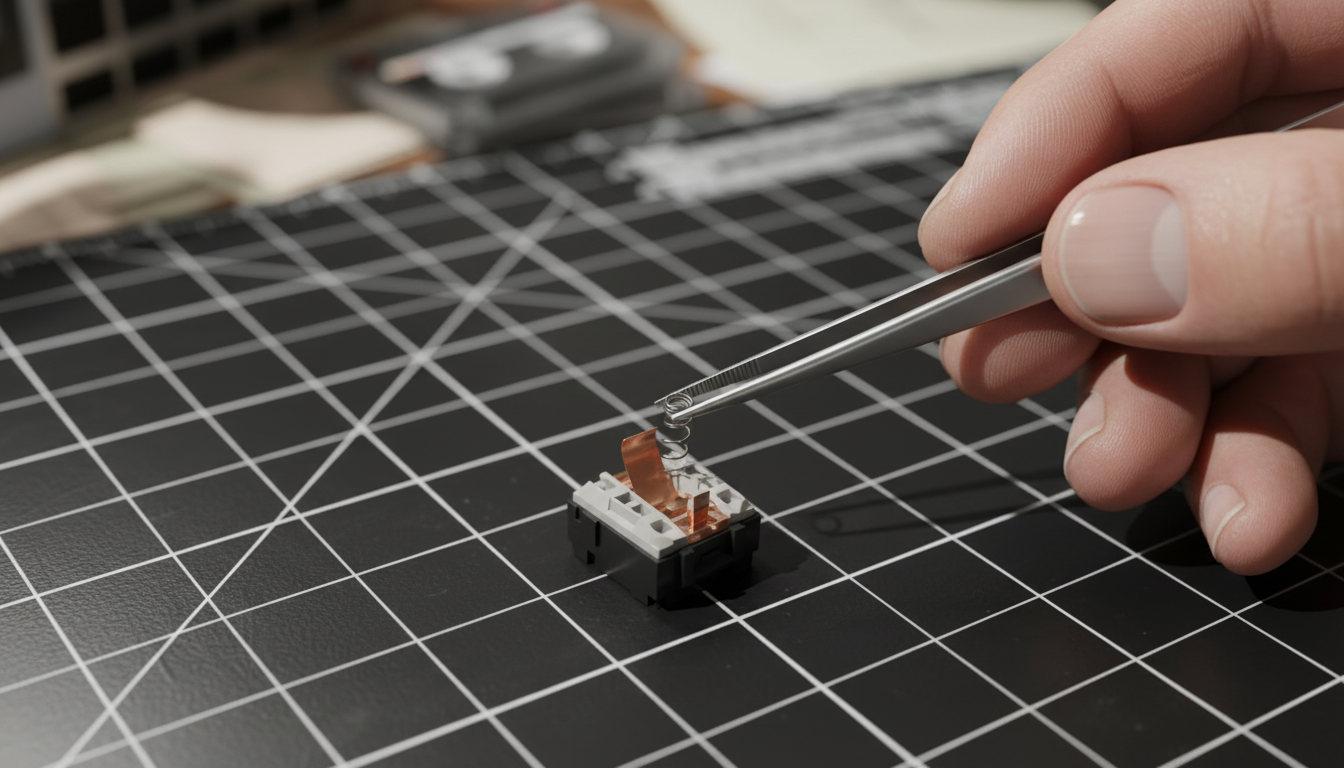
Modifying a mouse switch requires precision and a controlled environment. The process involves opening the mouse shell, desoldering the switch (or opening the switch housing in-place if the mouse design allows), and replacing the internal coil spring.
1. Sourcing and Selection
Always purchase a variety pack of springs. Because of manufacturing tolerances, a "15g" spring from one supplier may feel different from another. Experienced modders often use a force gauge to verify the tension before installation.
2. Lubrication and "Ping" Elimination
One of the most frequent complaints after a spring swap is "spring ping"—a metallic ringing sound after a click. Applying a thin layer of high-performance grease, such as Krytox 205g0, to the spring ends and the plunger stem can eliminate this. This creates a smoother, more consistent press that practitioners find as important as the force rating itself.
3. Reassembly and Testing
A common pitfall is misaligning the spring during reassembly. If the click feels "mushy" or fails to reset properly, the spring is likely binding against the housing or the plunger is not seated correctly. Always test the switch mechanism manually before closing the mouse shell.
Performance Synergy: Polling Rates and Latency
For users of high-performance mice, the interaction between mechanical mods and digital polling rates is a critical performance variable. Modern flagships often support an 8000Hz polling rate, which translates to a near-instant 0.125ms reporting interval.
The 8K Polling Math
At 8000Hz, the system latency is significantly reduced. A critical factor often misunderstood is Motion Sync. While Motion Sync adds a deterministic delay of ~0.5ms at 1000Hz, at 8000Hz, this delay scales down to approximately 0.0625ms (half the polling interval).
To fully saturate this 8000Hz bandwidth, the sensor must provide enough data points. This is governed by the formula: Packets = IPS * DPI. For example, a user must move at 10 IPS at 800 DPI to saturate the 8000Hz stream. At 1600 DPI, the required speed drops to 5 IPS. This means that users who prefer lower DPI settings must move the mouse faster to maintain the stability of the high polling rate.
System Bottlenecks
Operating at 8000Hz places a significant load on the CPU's Interrupt Request (IRQ) processing. To avoid packet loss and micro-stutter, devices must be connected to Direct Motherboard Ports (Rear I/O). Using USB hubs or front-panel headers is strictly discouraged due to shared bandwidth and potential interference, which can negate the latency benefits of the 8K hardware.
Scenario Modeling: The Large-Handed Competitive Gamer
To demonstrate the practical application of these principles, we modeled a scenario for a competitive FPS gamer with large hands (~21.5cm length) using a fingertip grip.
The "Double Ergonomic Penalty"
Our analysis suggests that large-handed users often face a mismatch with standard mouse dimensions (typically ~120mm in length). For a 21.5cm hand, the ideal mouse length is approximately 129mm (based on a 0.6x hand-length heuristic for fingertip grips). A standard mouse yields a grip fit ratio of 0.93, forcing the fingers into a cramped, high-tension position.
When this postural strain is combined with heavy stock switches (60g+), the risk of fatigue increases exponentially. In our model, this setup resulted in a "Hazardous" rating on the Moore-Garg Strain Index.
The Custom Solution
By swapping to a 15g spring and lubricating the assembly, the "Intensity" multiplier in the strain equation is significantly reduced. Our modeling indicates that this single hardware change can reduce the calculated strain score by over 50%, moving the user from a high-risk category to a more sustainable ergonomic profile without sacrificing the precision required for 8000Hz tracking.
Trust, Safety, and Compliance
When undertaking DIY modifications, users must be aware of the regulatory and safety implications, particularly regarding wireless devices.
- RF Compliance: Modifying the internal structure of a mouse should not interfere with the antenna or the RF shielding. Devices certified under FCC Part 15 or ISED Canada maintain strict limits on electromagnetic interference.
- Battery Safety: If the modification requires removing the battery, ensure it is handled according to IATA Lithium Battery Guidance. Never puncture or apply excessive heat to the lithium-ion cell.
- Warranty: Physical disassembly and soldering almost universally void manufacturer warranties. This mod is intended for enthusiasts who prioritize customization over official support.
Methodology and Modeling Transparency
The data and scenarios presented in this article are derived from deterministic parameterized modeling and established ergonomic heuristics.
| Parameter | Value / Range | Unit | Rationale |
|---|---|---|---|
| Hand Length | 21.5 | cm | 95th Percentile Male (ANSUR II) |
| Polling Rate | 8000 | Hz | High-performance standard |
| Base Latency | 0.8 | ms | High-end sensor baseline |
| Motion Sync Delay | 0.5 * Interval | ms | Signal processing group delay |
| Strain Index Threshold | > 5 | Score | ACGIH/Moore-Garg standard for risk |
Modeling Note: These results are screening tools for identifying ergonomic risks and technical bottlenecks. They are not controlled lab studies and do not account for individual physiological variations or specific firmware efficiencies.
By treating the mouse switch as a tunable component rather than a fixed specification, gamers can bridge the gap between high-speed performance and long-term ergonomic health. Whether through spring swapping or software-based actuation adjustments, the goal remains the same: a peripheral that acts as a seamless extension of the user’s intent.
Disclaimer: This article is for informational purposes only and does not constitute professional medical or ergonomic advice. DIY hardware modifications carry inherent risks, including potential damage to equipment and voiding of warranties. Consult a qualified professional if you are experiencing persistent hand or wrist pain.


Laisser un commentaire
Ce site est protégé par hCaptcha, et la Politique de confidentialité et les Conditions de service de hCaptcha s’appliquent.