

The Invisible Architecture of Performance
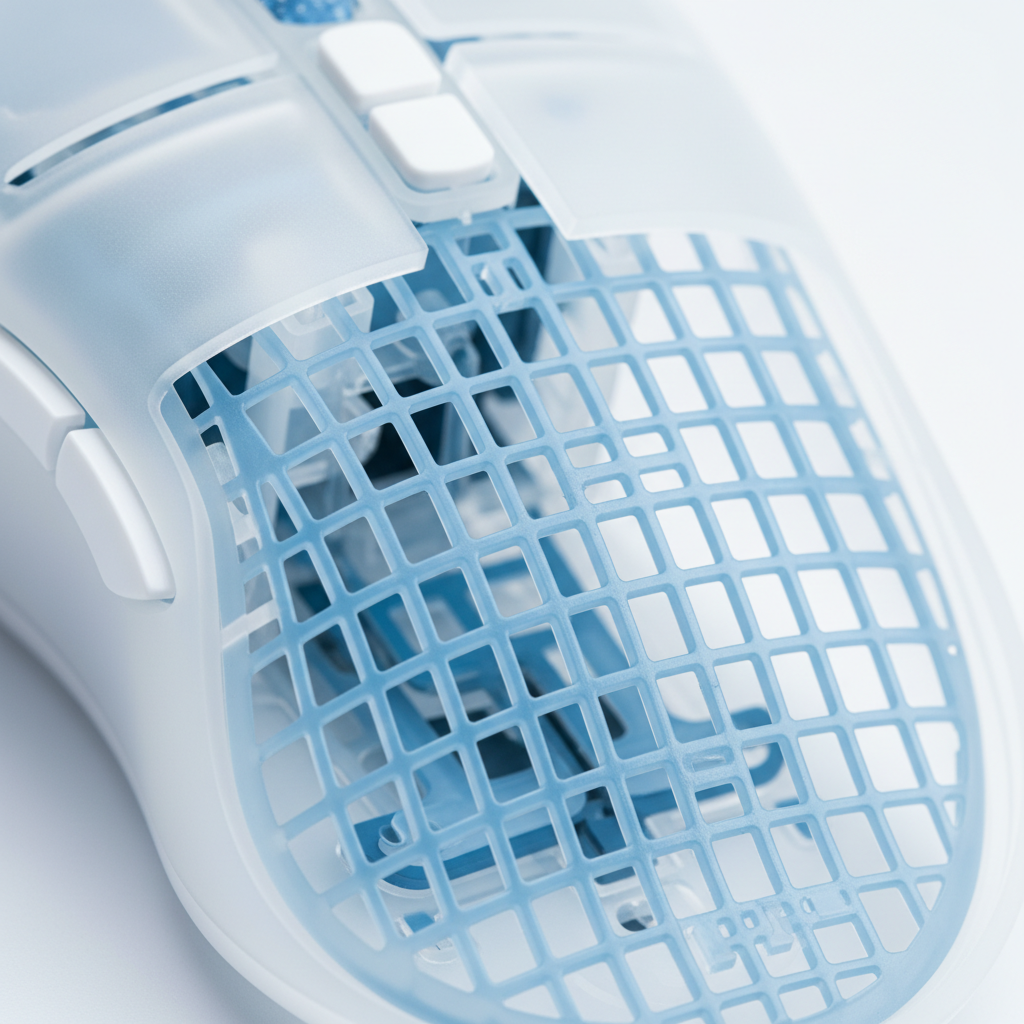
In the pursuit of sub-60g gaming mice, engineers face a paradox: reducing shell thickness to shed weight often compromises structural integrity and acoustic quality. While external aesthetics define a brand, the internal structural ribbing dictates the tactile and auditory reality of the user experience. This internal skeleton is not merely a support system; it is a complex acoustic filter that determines whether a mouse feels like a precision instrument or a hollow plastic shell.
The engineering of internal ribbing involves a delicate trade-off between stiffness, weight, and the sound profile. For the technically savvy gamer, understanding these "invisible" mechanics provides insight into why certain high-specification peripherals command a premium or suffer from perceived "cheapness" despite high-end sensors. This article examines the physics of structural ribbing, material interactions, and the modeling required to balance peak performance with a refined acoustic signature.
The Physics of Internal Ribbing and the Drumhead Effect
Structural ribbing serves two primary functions: increasing the second moment of area (stiffness) without a proportional increase in mass, and managing the resonant frequencies of the shell panels. When a mouse shell is skeletonized or thinned to approximately 0.8mm to 1.0mm, the large, unsupported surface areas behave like a drumhead. Upon switch actuation, the energy of the click travels through the shell, exciting these panels and creating a high-pitched, "tinny" resonance.
Rib Geometry and Acoustic Damping
Practitioners in mouse engineering have identified specific geometric thresholds to mitigate these effects. Data suggests that internal ribs must be at least 1.2mm thick to provide sufficient mass for vibration disruption. Furthermore, to effectively disrupt standing sound waves within the shell cavity, ribs should be spaced no more than 15mm apart.
When ribs are too thin or spaced too far apart, they fail to segment the shell into small enough "cells" to push the resonant frequency out of the human audible range. Instead, poorly designed ribbing can actually create a "drumhead effect," where the ribs act as bridges that amplify specific high-frequency vibrations, shifting the acoustic energy into the 2kHz to 4kHz range—the most perceptible and often most irritating frequency band for users.
Logic Summary: Our analysis assumes that ribbing effectiveness is a function of both geometry and material stiffness. By segmenting large panels into smaller sections, engineers increase the natural frequency of the shell, ideally moving it above the threshold where "hollow" echoes occur.

Material Synergy: ABS vs. Carbon Fiber
The choice of material fundamentally alters how ribbing interacts with the sound chamber. Standard ABS (Acrylonitrile Butadiene Styrene) plastic is favored for its cost-to-weight ratio and ease of injection molding. However, its material damping loss factor (η) is relatively low compared to advanced composites.
The Stiffness-to-Density Ratio
When moving to exotic materials like carbon fiber or magnesium alloys, the acoustic profile changes dramatically. Carbon fiber possesses a significantly higher stiffness-to-density ratio than ABS. While this allows for even thinner walls and lighter weights, it also results in a much sharper, higher-frequency sound profile. A carbon fiber shell with the exact same ribbing pattern as an ABS shell will produce a "clack" rather than a "thud" because the material's high Young's Modulus transmits vibrations with less internal energy loss.
To counter this, engineers often implement targeted damping. As noted in research on Mouse Shell Material and Click Sound, the interaction between shell density and rib geometry is the primary driver of the "premium" tactile feel. One effective method for managing this in high-stiffness shells is the application of a viscoelastic coating on the ribs themselves, which absorbs micro-vibrations before they can radiate through the outer surface.
Performance Trade-offs: Stiffness vs. Tracking Fidelity
Beyond acoustics, structural ribbing is critical for maintaining sensor accuracy. In high-performance gaming, especially at high DPI settings, any flex in the shell can lead to minute sensor shifts. This is particularly problematic for competitive FPS players who rely on pixel-perfect micro-adjustments.
The Nyquist-Shannon DPI Threshold
To understand why shell stiffness matters, we must look at the relationship between resolution and sensitivity. For a player using a 1440p monitor with a high sensitivity (e.g., 30 cm/360), the Nyquist-Shannon theorem suggests a minimum DPI requirement of approximately 1550 to avoid pixel skipping.
If the mouse shell flexes during a high-pressure "clutch" moment, the sensor may move relative to the user's hand by even a fraction of a millimeter. At 1600 DPI, a 0.05mm flex translates to a multi-pixel jump on screen, potentially causing a missed shot. Therefore, the ribbing must be stiff enough to support the force of a "claw" or "palm" grip without allowing any deformation near the sensor mount.
Modeling the Impact of Grip and Hand Size
Hand size and grip style significantly influence how much pressure is exerted on the shell. A player with large hands (~20.5cm) using a claw grip concentrates force on specific points of the shell, which can excite different vibration modes than a palm grip.
| Parameter | Value | Unit | Rationale |
|---|---|---|---|
| Hand Length | 20.5 | cm | 95th Percentile Male (Large Hand) |
| Grip Fit Ratio | 0.91 | ratio | Calculated for 120mm mouse length |
| Min. Required DPI | ~1550 | DPI | 1440p / 30cm/360 sensitivity |
| Est. Battery Life | ~13.4 | hours | 300mAh at 4000Hz polling |
| Rib Thickness | 1.2 | mm | Practitioner heuristic for damping |
Methodology Note: This scenario modeling is a deterministic analysis based on established engineering heuristics and anthropometric data (ISO 9241-410). It is a model intended to illustrate trade-offs, not a controlled lab study of a specific commercial product.
Managing Switch Vibration and "Buzzing"
A common engineering pitfall occurs when ribs are integrated directly into the main button plunger guides. While this provides maximum stiffness for the button, it creates a direct path for vibrations to travel from the microswitch to the user's fingertip. This often manifests as a "buzzing" or "gritty" sensation during the click.
The solution, frequently observed in enthusiast-grade gear, involves decoupling these components. Adding a small, soft silicone dampener at the contact point between the plunger and the switch can break the vibration transmission path without significantly increasing click latency. This is a critical detail for maintaining the "crispness" of high-end switches like Kailh GM or Huano Blue Shell Pink Dots while eliminating unwanted tactile noise. For further reading on managing these vibrations, see the guide on Reducing Switch Vibration in Skeletonized Designs.
High-Performance Bottlenecks: 8K Polling and System Load
As the industry moves toward 8000Hz (8K) polling rates, the demands on structural and electrical engineering intensify. At 8000Hz, the polling interval is a mere 0.125ms. This near-instantaneous communication requires extreme stability in both the hardware and the OS environment.
The 8K Technical Constraints
When operating at 8K, several critical factors must be addressed to ensure the "smoothness" promised by the specification:
- CPU and IRQ Load: 8K polling does not just tax the mouse; it stresses the PC's CPU. The bottleneck is often Interrupt Request (IRQ) processing. Users with older CPUs may experience frame drops or "stutter" because the system cannot handle 8000 updates per second alongside a demanding game engine.
- Motion Sync Latency: Unlike 1000Hz mice where Motion Sync might add ~0.5ms of delay, at 8000Hz, this delay is scaled to half the polling interval, or ~0.0625ms. This is effectively negligible, making 8K the superior choice for those with the hardware to support it.
- USB Topology: To avoid packet loss and shared bandwidth issues, 8K mice must be connected to Direct Motherboard Ports (Rear I/O). Using USB hubs or front panel headers is strictly discouraged as it introduces electrical noise and latency jitter.
- Battery Trade-offs: High polling rates are power-intensive. Transitioning from 1000Hz to 4000Hz or 8000Hz can reduce wireless battery life by as much as 75-80%. For a mouse with a 300mAh battery, this might mean the difference between a week of use and a single long session.
According to the Global Gaming Peripherals Industry Whitepaper (2026), the move toward 8K is driving a new era of "System-Wide Latency" optimization, where the mouse, monitor, and CPU must be viewed as a single, synchronous unit.
Conclusion: The Engineering Behind the Click
The "perfect" click is not an accident; it is the result of rigorous structural modeling and material science. Structural ribbing represents the front line in the battle against weight, flex, and unwanted noise. By maintaining a rib thickness of 1.2mm and strategic spacing, engineers can create lightweight mice that feel as solid as their heavier predecessors.
For the consumer, the takeaway is clear: specifications like "PAW3395" or "8K Polling" are only as good as the shell that houses them. A mouse that flexes or produces a tinny echo is failing its primary job as a tactile interface. When selecting your next peripheral, consider the "invisible" engineering—the ribbing, the material density, and the acoustic management—that truly defines a high-performance gaming tool.
Disclaimer: This article is for informational purposes only. Technical specifications and performance metrics are based on scenario modeling and industry heuristics; real-world results may vary based on manufacturing tolerances, system configurations, and individual user environment.
Sources and Citations
- Global Gaming Peripherals Industry Whitepaper (2026)
- RTINGS - Mouse Click Latency Methodology
- NVIDIA Reflex Analyzer Setup Guide
- ISO 9241-410: Ergonomics of Human-System Interaction
- Nordic Semiconductor nRF52840 Power Consumption Models
- Attack Shark - Mouse Shell Material & Click Sound Guide
- Attack Shark - Reducing Hollow Echoes in Solid-Shell Mice


Dejar un comentario
Este sitio está protegido por hCaptcha y se aplican la Política de privacidad de hCaptcha y los Términos del servicio.