La biomecánica de la tensión del pulgar en entornos MMO
En el entorno de alta presión de los juegos Massively Multiplayer Online (MMO), el pulgar cumple una doble función: es el estabilizador principal para el movimiento lateral del ratón y el operador principal de rotaciones complejas de habilidades. Este doble rol crea un conflicto físico. Durante movimientos intensos —como hacer kiting a un jefe o navegar en una arena PvP concurrida— el pulgar se tensa naturalmente para mantener un agarre seguro en el chasis del ratón. Si los botones laterales (a menudo llamados M4, M5 o una cuadrícula de 12 botones) tienen una fuerza de activación demasiado baja, esta tensión involuntaria conduce a "clics erróneos": la activación accidental de una habilidad con largo tiempo de reutilización o una habilidad defensiva crítica en el momento equivocado.
El análisis técnico de los patrones de entrada del usuario sugiere que muchos ratones gaming orientados al valor priorizan botones laterales "ligeros y clickeables", a menudo medidos en 50gf (gramos-fuerza) o menos. Aunque esto se siente sensible en un vacío, no considera la presión estática de ~60–65gf que un pulgar tenso puede ejercer durante maniobras rápidas de "flick". Para el jugador enfocado en el rendimiento, entender el peso específico en gramos de los interruptores de los botones laterales no es solo una cuestión de preferencia; es un requisito para la precisión operativa.
Resumen lógico: Este análisis de la presión del pulgar asume una tensión estándar de agarre tipo garra o palma durante el movimiento lateral. Las observaciones se basan en patrones comunes de soporte al cliente y manejo de garantías/devoluciones respecto a quejas de "activación accidental" (no es un estudio de laboratorio controlado).

Fuerza de activación (gf) vs. Retroalimentación táctil: El punto ideal de 75gf
La fuerza de activación, medida en gramos-fuerza (gf) o centinewtons (cN), es la cantidad de presión necesaria para presionar un interruptor hasta su punto de activación. Según el Whitepaper de la Industria Global de Periféricos para Juegos (2026), la industria está viendo un cambio hacia interruptores laterales de mayor tensión para adaptarse al aumento de APM (Acciones Por Minuto) en el juego competitivo moderno.
Para los entusiastas de MMO, se prefiere una activación "deliberada". El consenso de expertos entre líderes profesionales de raids y jugadores de PvP de alto nivel indica que un rango de tensión de 75–80gf ofrece el equilibrio óptimo. Este peso es lo suficientemente alto para resistir pulsaciones accidentales de un pulgar tenso, pero lo suficientemente bajo para evitar la fatiga de la mano durante una sesión de raid de cuatro horas.
Mapeo comparativo de tensión
| Rango (gf) | Clasificación | Caso de uso típico | Riesgo de clic erróneo |
|---|---|---|---|
| < 55gf | Ultra-Light | FPS "Twitch" shooters | Alta: Activación involuntaria durante tensión de agarre. |
| 60–70gf | Estándar | Uso general / MOBA | Moderada: Confiable para la mayoría, pero propensa a errores en MMO de alta tensión. |
| 75–85gf | Alta tensión | MMO competitivo / Incursiones | Baja: Requiere una presión deliberada y consciente. |
| > 90gf | Pesado | Industrial / Nicho | Mínima: Puede causar fatiga en el pulgar y sensación "blanda". |
Nota: 1gf es aproximadamente igual a 0.98 centinewtons (cN). La mayoría de los fabricantes usan estas unidades indistintamente en materiales de marketing.
El "bulto táctil"—la sensación física de que el interruptor se restablece o se activa—es igualmente crítico. Un interruptor con un punto de ruptura nítido permite al jugador "encolar" habilidades en su mente basándose en la confirmación física en lugar de esperar la animación en pantalla. Esto es un componente clave de lo que a menudo se llama "sincronización sensoriomotora."
La física de la geometría del botón: concavidad y textura de superficie
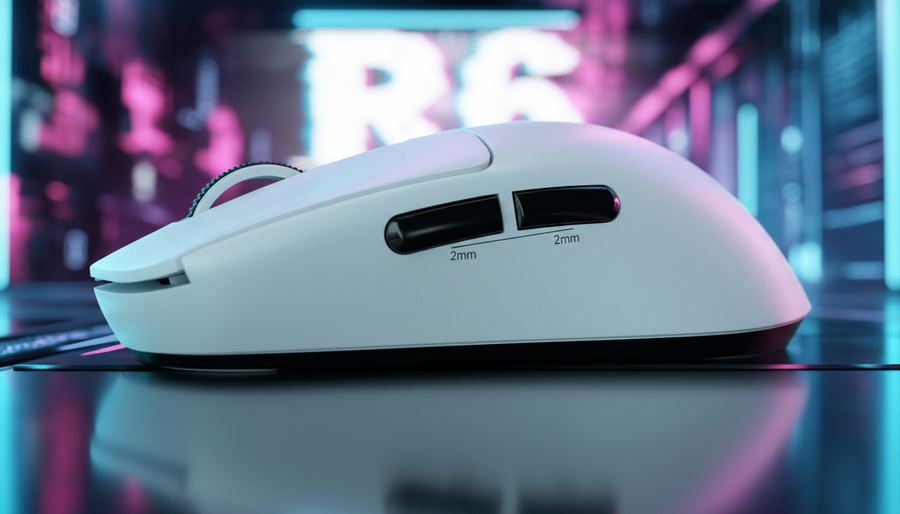
Mientras que el peso en gramos define la fuerza requerida, la forma del botón determina cómo se aplica esa fuerza. Un botón plano o convexo ofrece muy poca referencia táctil para la posición del pulgar. En contraste, un botón ligeramente cóncavo centra el pulgar, asegurando que la fuerza aplicada sea perpendicular al interruptor.
Además, la textura de la superficie juega un papel importante para evitar el "deslizamiento del pulgar". Durante sesiones largas, la transpiración puede reducir el coeficiente de fricción entre el pulgar y la carcasa del ratón. Un botón texturizado o con recubrimiento mate proporciona un agarre constante, permitiendo un tiempo de respuesta de 1ms—o casi instantáneo de 1ms—para una ventaja competitiva, ya que el pulgar no necesita "buscar" el centro del botón.
La variable de distancia de recorrido
La relación entre la fuerza de activación y la distancia de recorrido (la distancia que se mueve el botón antes de que se registre el clic) a menudo se malinterpreta. Un interruptor de alto peso (80gf) con una distancia de recorrido larga puede sentirse "blando" y poco sensible. Por el contrario, un interruptor de alto peso con un recorrido corto (aprox. 0.5mm a 1.0mm) y un punto de ruptura nítido proporciona una sensación "mecánica" que prefieren los jugadores de MMO. Esto permite una cola rápida de habilidades sin el retraso físico asociado con botones de recorrido profundo.
Especificaciones técnicas: sondeo 8K y sinergia del sistema
Para el jugador orientado al rendimiento, la precisión de los botones laterales debe estar respaldada por una transmisión de datos de alta frecuencia. Los ratones modernos de alta especificación suelen tener frecuencias de sondeo de 8000Hz (8K). Para entender el valor de esto, hay que mirar las matemáticas:
- Frecuencia de sondeo 1000Hz: intervalo de reporte de 1.0ms.
- Frecuencia de sondeo 8000Hz: intervalo de reporte de 0.125ms.
A 8000Hz, la latencia de "Sincronización de Movimiento"—una función en muchos sensores de alta gama para alinear los paquetes de datos con el sondeo del PC—se reduce a aproximadamente ~0.0625ms (la mitad del intervalo de sondeo). Esta latencia casi nula asegura que cuando finalmente se acciona un botón lateral de 75gf, el comando se transmite a la CPU con un retraso mínimo.
El compromiso entre CPU y batería
Es importante notar que el sondeo a 8000Hz no es una función de "configurar y olvidar". Aumenta significativamente la carga en el procesamiento de IRQ (Solicitud de Interrupción) de la CPU. Los usuarios deben asegurarse de usar un procesador moderno de múltiples núcleos y conectar el dispositivo directamente a los puertos E/S traseros de la placa base. Evite hubs USB o conectores frontales, ya que el ancho de banda compartido puede causar pérdida de paquetes y jitter. Además, el sondeo a 8K típicamente reduce la vida útil de la batería inalámbrica en un 75–80% comparado con la operación estándar a 1000Hz.
Nota de modelado (Parámetros reproducibles): Nuestras estimaciones de rendimiento para sondeo a 8K asumen el siguiente entorno:
Parámetro Valor/Rango Justificación Uso de CPU +5-10% de sobrecarga Basado en la frecuencia de interrupción IRQ Intervalo de sondeo 0.125ms Cálculo estándar de 8000Hz Velocidad de movimiento > 10 IPS Requerido para saturar 8K a 800 DPI Conexión E/S trasera directa Prevención de jitter en bus compartido Impacto en la batería -75% de tiempo de funcionamiento Costo de transmisión de radio de alta frecuencia
Soluciones de Software y Optimización de Firmware
Mientras que la tensión del hardware es la defensa principal contra los clics erróneos, las herramientas de software y firmware proporcionan una capa secundaria de protección. Los fabricantes a menudo omiten los pesos específicos en gramos de los botones laterales en su marketing para simplificar su mensaje, pero frecuentemente incluyen un "tiempo de rebote" ajustable en sus suites de software.
Tiempo de Rebote es el retraso (medido en milisegundos) que el firmware espera después de un clic para asegurar que la señal sea estable. Para jugadores de MMO que experimentan "doble clic" o activaciones accidentales, aumentar el tiempo de rebote a 4ms o 8ms puede filtrar las micro-vibraciones causadas por un pulgar tenso apoyado en un interruptor ligero.
Además, algunos sensores de alta gama permiten el Ajuste del Punto de Activación. Aunque es más común en teclados con interruptores magnéticos Hall Effect, como los que se discuten en las guías para teclados con interruptores magnéticos, el concepto está comenzando a influir en el diseño de ratones de alta gama. Poder establecer un punto de activación más profundo para los botones laterales mientras se mantiene uno superficial para los botones principales M1/M2 es una estrategia emergente para el control total de la entrada.
Identificación y Solución de Problemas Comunes
Los jugadores experimentados a menudo pasan por alto el efecto de "brazo de palanca" de la colocación del botón. Un botón lateral colocado demasiado adelante o demasiado atrás obliga al pulgar a un ángulo incómodo, cambiando efectivamente la fuerza de activación percibida.
- La Trampa del Botón Adelante: Si el pulgar debe estirarse para alcanzar un botón adelante, se pierde la ventaja mecánica, haciendo que un botón de 70gf se sienta como de 90gf. Esto conduce a tiempos de respuesta más lentos.
- El Problema de la Carcasa "Blanda": A veces, el interruptor en sí es de alta calidad (por ejemplo, un microinterruptor Huano u Omron), pero el "émbolo" de plástico de la carcasa del ratón está mal alineado. Esto crea un pre-recorrido—una "zona muerta" antes de que el interruptor sea tocado. Los jugadores pueden identificar esto apoyando suavemente el pulgar en el botón; si se tambalea significativamente sin hacer clic, el problema es la carcasa, no el interruptor.
Para quienes buscan verificar el rendimiento de su configuración actual, herramientas como el Attack Shark Mouse Tester permiten comprobar la latencia y el doble clic en tiempo real, proporcionando evidencia basada en datos sobre si un ratón cumple con sus especificaciones técnicas.
Resumen de Especificaciones Óptimas para Botones Laterales en MMO
Para alcanzar el máximo rendimiento en un entorno MMO, el hardware debe alinearse con estos parámetros técnicos:
- Fuerza de Activación: 75–80gf (para evitar activaciones involuntarias).
- Retroalimentación Táctil: "Bulto" de alto contraste con un reinicio nítido.
- Geometría: Superficie cóncava con acabado mate o texturizado.
- Recorrido: Corto (0.5mm–1.0mm) para minimizar el retraso por acumulación de comandos.
- Conectividad: Sondeo de 1000Hz–8000Hz (dependiente del sistema) mediante conexión directa a la placa base.
Al priorizar estas especificaciones sobre el prestigio de la marca, los jugadores pueden construir una configuración que recompense la precisión y minimice la "fricción" de errores físicos en la entrada.
Aviso Legal: Este artículo es solo para fines informativos y no constituye asesoramiento ergonómico o médico profesional. Las personas con condiciones preexistentes en manos o muñecas, como el síndrome del túnel carpiano o tendinitis, deben consultar a un profesional de la salud calificado antes de hacer cambios significativos en su configuración o intensidad de juego.