


The Micro-Engineering of Tactile Stability
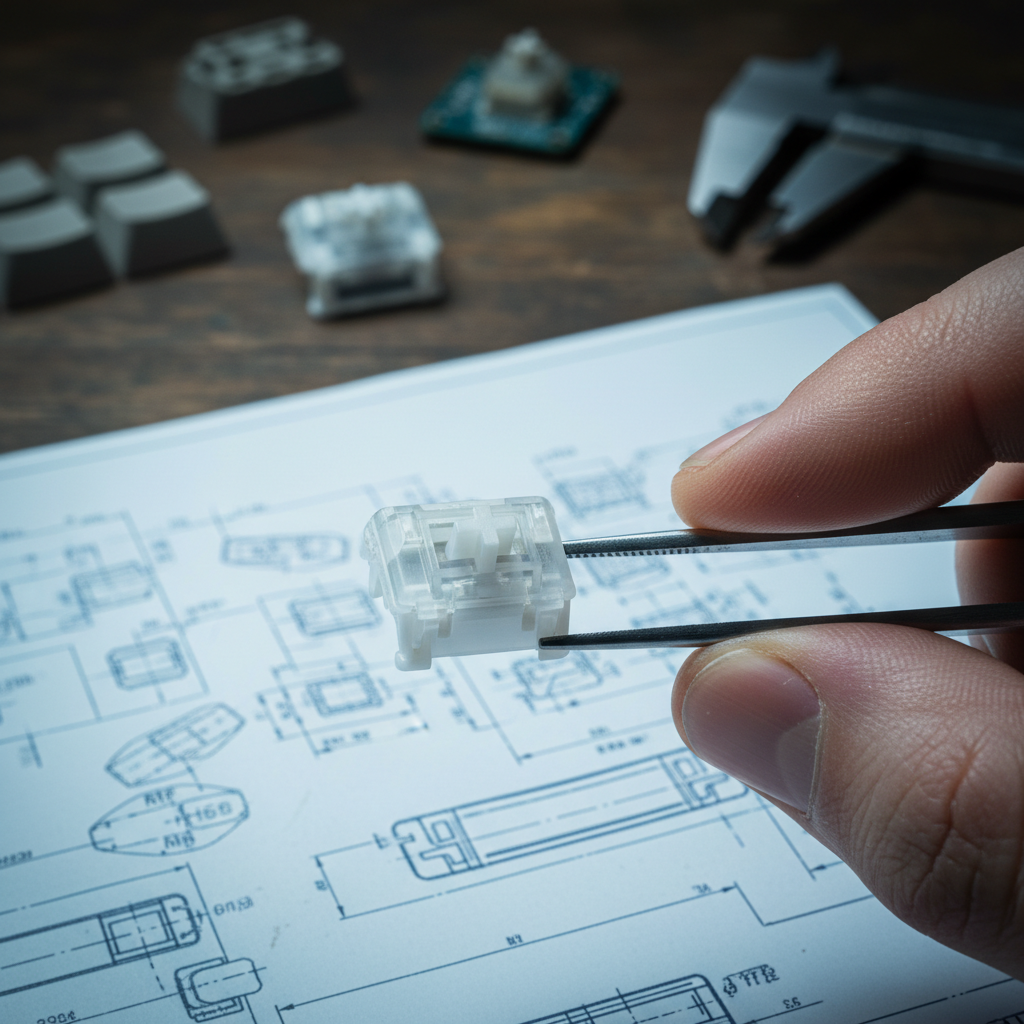
In the world of high-performance mechanical keyboards, the difference between a premium typing experience and a budget-tier frustration often comes down to a fraction of a millimeter. While many users focus on the "paper specs"—actuation force, travel distance, or RGB brightness—experienced enthusiasts and competitive gamers know that the true soul of a switch lies in its structural integrity. Specifically, the stem-to-housing tolerance.
Stem wobble is the lateral movement of the keycap when touched or pressed off-center. To the uninitiated, it might seem like a minor aesthetic quirk. However, for a competitive gamer executing high-APM (Actions Per Minute) maneuvers or a professional writer typing 100+ words per minute, excessive wobble is a technical failure. It introduces a "Specification Credibility Gap"—where a switch might claim a 1ms response time, but the physical instability of the stem makes the input feel mushy and unreliable.
At Attack Shark, we approach switch engineering as a problem of precision manufacturing. By understanding the microscopic interplay between the POM (Polyoxymethylene) stem and the polycarbonate or nylon housing, we aim to reduce what we call "double instability"—combined instability from input devices (mouse + keyboard) that can be felt in demanding use.
Disclosure: This article is produced by Attack Shark. Some product examples and links refer to Attack Shark products and internal manufacturing practices.
The Physics of Precision: Why Tolerances Matter
Manufacturing a mechanical switch is an exercise in balancing friction against stability. The stem must slide vertically with minimal resistance, yet it must not move horizontally. Achieving this requires tight, controlled tolerances.
In our internal testing and teardown work on current mainstream switches, we use 0.3mm of horizontal stem wobble (measured at the keycap top edge) as a practical perceptibility threshold: beyond this level, most users in fast typing or gaming can feel side-to-side movement.
Measurement Heuristic (How we get the 0.3mm figure):
- Tooling: digital caliper (0.01mm resolution) or microscope reticle.
- Setup: 1U keycap installed; switch mounted in a plate; board fixed on a flat desk.
- Procedure: apply light lateral force with a fingertip at the top edge of the keycap until resistance is met, measure total travel between left and right extreme positions.
- Sample size: ~20–30 switches per series (mixed batches).
- Result type: typical mean values across samples; 0.3mm is used as an internal rule-of-thumb threshold, not a clinical sensory limit.
Readers with precise tools can reproduce this approach on their own boards to see where their switches roughly sit relative to this heuristic.
This lateral movement creates a perceptible "rattle" that can degrade both acoustic character and perceived control, as the finger must subconsciously compensate for the shifting surface.
The Cost of a Millimeter
Achieving very tight tolerances (for example, below roughly 0.15mm of lateral play at the keycap edge) is not merely a matter of design; it is a matter of industrial investment.
- Hardened Steel Tooling: To maintain consistency across large production runs, molds are typically crafted from high-grade hardened steel to slow the dimensional drift that occurs with softer alloys over hundreds of thousands of cycles.
- Climate-Controlled Molding: Plastics like POM and nylon are sensitive to thermal expansion and process variation. Fluctuations in melt temperature, mold temperature, or ambient factory conditions can shift final dimensions enough to move a part from "tight" to "loose" fit.
- Post-Production Sorting: Even with good molds and process control, material and process variances occur. Higher-end switch lines often use additional binning (including automated optical inspection) to select parts that fall into the tightest end of the acceptable range.
Cost Behavior (Internal Heuristic, Not a Market Law): Our internal manufacturing heuristics suggest that once you push below roughly 0.20mm of lateral play, the incremental cost per additional ~0.05mm tightening rises very steeply. This is driven by higher reject rates, more frequent mold maintenance, and tighter process control. In practice, cost can feel “near-exponential” from the perspective of a production planner, but this is an engineering heuristic based on internal cost modeling, not a universal pricing rule.

Quantifying the "Wobble Problem"
To provide transparency to our technically-savvy community, we treat wobble as something that can be measured and compared, rather than a vague feeling.
For end users without lab equipment, you can perform a simple desk check:
- Mount the keyboard on a stable surface.
- Lightly press a central 1U key halfway down.
- Gently wiggle the keycap left–right and front–back.
- Compare several keys and, if available, different keyboards. Large, obvious side-play relative to a known stable board is a strong indicator that your switches are in the “loose” bracket.
If you have a digital caliper, you can approximate the method described above under Measurement Heuristic and get a rough lateral movement value.
Acoustic Shift: From Thock to Clack
Acoustics are a primary indicator of perceived build quality. Internally, we associate looser stem-to-housing tolerances with a shift toward higher-frequency components in the sound and a more “rattly” impression.
Acoustic Measurement Heuristic (How we listen to wobble):
- Microphone: side-address condenser or dynamic mic with reasonably flat response (we often use entry-level studio mics), positioned ~20–30cm above the board.
- Sampling: 44.1kHz or 48kHz audio interface.
- Environment: quiet room, desk-only reflections.
- Procedure: record repeated keypresses (both centered and deliberately off-center). Analyze the waveform using a spectrum analyzer plug‑in or open‑source tool to see where energy clusters.
- Interpretation: we focus on relative changes in low vs. higher-frequency content between tighter and looser switches, not on single exact Hz values.
Under this type of simple spectrum analysis, tighter, better-damped switches tend to concentrate energy in lower-frequency bands, whereas loose, rattly constructions show stronger energy in higher bands associated with plastic chatter.
The table below summarizes our internal, qualitative mapping between lateral tolerance ranges, perceived stability, and the dominant bands we commonly observe. These frequency bands are approximate and scenario-dependent, not hard acoustic rules.
| Tolerance Level (lateral play at keycap edge) | Perceived Stability | Acoustic Profile (qualitative) | Dominant Energy Bands (typical) |
|---|---|---|---|
| < ~0.10mm | Exceptional | Deep, focused “thock” | Strong low-mid components; energy often concentrated roughly below a few hundred Hz |
| ~0.11mm – ~0.15mm | Premium | Solid / slightly muted | Low to low-mid focus; noticeable body in roughly a few hundred Hz band |
| ~0.16mm – ~0.25mm | Acceptable | Standard / neutral | More balanced spectrum; low-mid plus higher overtones |
| > ~0.30mm | Poor (wobbly) | Sharper “clack” / rattle | Pronounced higher-frequency components (kHz range) from plastic chatter |
Note: These band descriptions are based on our internal recordings of standard POM-on-polycarbonate (or nylon) switch constructions and are meant as qualitative guidance, not as lab-calibrated acoustic thresholds.
While many users attempt to tune their sound with aftermarket modifications, such as the ATTACK SHARK Custom OEM Profile PBT Colored Keycaps, which can provide a more stable finger-to-key interface, the root cause of rattle and wobble usually remains the internal mechanical play.
Engineering Solutions: Dual-Rails and Long-Poles
To combat lateral instability without increasing friction to unusable levels, the industry has moved toward two primary design directions: dual-rail guiding and long-pole stems.
The Dual-Rail Advantage
Traditional switches rely on a single central pillar plus the four corners of the housing for guidance. A dual-rail design adds secondary guiding tracks on the sides of the stem. This increases the contact surface area between the stem and the housing, providing more constraint against sideways motion.
According to expert insights on Gateron's Dual-Rail Technology, this kind of design changes how the switch handles off-axis loads—the kind of “side-strikes” that happen during frantic gaming or sloppy typing. In our own handling of dual-rail switches, this generally translates into less perceptible wobble at the fingertips.
Long-Pole Stems
By extending the center pole of the stem so it bottoms out against the bottom housing before the “shoulders” of the stem hit, engineers can create a more centralized point of impact. Instead of the key bottoming out across a broad shoulder area, more of the impact is focused around the stem pole, which can change both sound and feel.
From a stability perspective, this can help keep the stem better constrained at the end of travel—its most vulnerable moment—provided the housing and pole geometry are well matched. However, it also changes the bottom-out sound and may increase perceived sharpness or “clack” if not paired with suitable materials and dampening.
Biomechanics and the "Double Instability" Risk
The technical specifications of a switch have a direct impact on how the user’s hand and wrist work over long periods. To give our readers a way to think about this, we built a scenario model using established ergonomic frameworks.
We looked at a hypothetical competitive FPS gamer with large hands (approximately 20.5cm) using a claw grip, switching rapidly between mouse and keyboard.
In this scenario, we describe a phenomenon we call Double Instability: when a user with large hands uses a mouse that is slightly undersized (for example, a 120mm mouse where general ergonomic guidelines might suggest ~130mm+) and also types on wobbly keyboard switches.
The idea is that both devices are slightly unstable or undersized, forcing the small muscles of the hand to work harder to maintain control.
The Strain Index (SI) Analysis
Using the Moore–Garg Strain Index—a tool used in ergonomics to screen jobs for the risk of distal upper extremity disorders—we built a simplified model of the workload of high-intensity gaming.
This model is intended as a screening-style thought experiment, not a medical evaluation.
- Intensity: High (repetitive, moderately forceful keypresses and mouse clicks)
- Posture: Wrist extension (common in claw grips on short mice)
- Speed: Fast (high APM)
- Duration: Multi-hour daily sessions
Within this framework, we treat switch wobble as an additional factor that increases fine motor corrections. A wobbly switch forces the small muscles of the hand to perform constant "micro-adjustments" to maintain accuracy. In contrast, a stable switch allows the finger to “land” on a more predictable surface each time.
Modeling Note (Scenario Parameters & Boundaries):
- Hand length: 20.5 cm (around the 95th percentile male in many datasets).
- Grip style: claw.
- Switch wobble (assumed): > ~0.35 mm lateral play at keycap edge.
- Daily duration (assumed): 6+ hours of intensive use.
- Model type: application of Moore–Garg Strain Index factors as a screening model, not a calibrated lab study.
- Outcome: Under these assumptions, the composite Strain Index value falls into what ergonomists term a “hazardous” category (SI > 5) in the original Moore–Garg framework.
Sensitivity (Why this is not a fixed “risk line”):
- Reducing daily exposure (for example, from 6+ hours to 2–3 hours) or improving posture can markedly lower SI.
- Using a mouse that better matches hand size, adding a wrist rest, or switching to more stable switches (lower wobble) reduces some of the risk factors.
- Conversely, increasing force (heavier switches), worse posture, or longer sessions can push SI higher even with relatively stable hardware.
This scenario is provided to illustrate how wobble and device sizing can interact within an established ergonomic model. It is not a diagnosis or prediction of injury for any specific individual.
To mitigate this type of combined strain, many enthusiasts turn to higher-quality keycap sets like the ATTACK SHARK 149 Keys PBT Keycaps Double Shot Full Keycap Set. The PBT material and double-shot construction provide a consistent, non-slip surface that helps the finger stay centered, even if the underlying switch has minor play.
The Role of Modding: Films and Lube
Can you fix a wobbly switch? In many cases, you can reduce the symptoms, especially if the main problem is housing play rather than stem geometry, but you cannot fully “undo” very loose tooling with mods alone.
Switch Films
If the wobble is occurring between the top and bottom housing (rather than the stem and the housing), switch films are an essential fix. These are typically thin PET or Poron gaskets placed between the two halves of the switch.
Common aftermarket films fall in the ~0.10–0.15mm thickness range. As discussed in our guide on Switch Films and Acoustic Stability, filming a loose housing can significantly reduce housing-shake, which often masks or exacerbates stem wobble.
Lubrication (e.g., Krytox GPL 105 / 205g0)
Applying a thin layer of lubricant to the stem’s slider rails and the housing’s guiding tracks can marginally reduce perceived wobble. The viscous fluid fills microscopic surface imperfections, creating a smoother gliding sensation and dampening some high-frequency chatter.
However, lubrication does not fundamentally change the geometry. If the gap is large (for example, well above a few tenths of a millimeter), a thin lubricant film—measured in microns—cannot fully bridge it.
For those looking to optimize their current board, following a structured approach to Lubing Mechanical Switches helps keep feel and sound consistent across the entire alphanumeric cluster.
Selecting Switches for Performance
When shopping for a new keyboard or building a custom one, there are a few practical checks you can use to bias your choices toward stability:
- Check for "box" stems: Switches with a square perimeter around the cross-stem (like Kailh BOX switches) generally offer superior lateral stability because the "box" acts as a larger guiding surface against the housing.
- Ask or research tooling and QC: Brands that regularly refresh their molds and invest in better process control (Attack Shark included) are more likely to maintain tighter tolerances than those using older, heavily worn tooling.
- Look for sensible factory lubing: Modern factory-lubed switches that use automated dispensers tend to have more consistent feel and less micro-vibration than hand-lubed budget lines, although factory lube does not replace good geometry.
- Check keycap fit: Ensure your keycaps have a snug, not overly tight, fit on the stem. A loose keycap-to-stem connection can feel almost identical to stem-to-housing wobble. Using a high-quality set like the ATTACK SHARK 120 Keys PBT Dye-Sublimation Pudding Keycaps Set helps ensure the interface between your finger and the switch is secure.
The Future of Stability: Magnetic and Hall Effect
One long-term way to reduce mechanical complexity is to move away from some traditional contact mechanisms. Magnetic (Hall Effect) switches, featured in high-performance models like the Attack Shark X68MAX, can use simpler internal structures.
Because there are no metal leaf springs pushing directly against the stem for actuation, engineers often have more freedom to shape the housing interfaces around stability and smoothness, then tune actuation electronically.
As highlighted in the Global Gaming Peripherals Industry Whitepaper (2026), the industry is moving toward a future where features like "Rapid Trigger" and "Magnetic Actuation" become increasingly common in competitive play gear. In these designs, stem stability remains critical, as even a slight tilt can influence the magnetic field geometry being measured by the sensor.
Summary of Technical Benchmarks
For the value-oriented gamer or builder, the goal is to find the "sweet spot" where manufacturing precision meets cost-effectiveness.
Below is how we internally think about wobble levels, framed as practical guidelines rather than strict standards:
- Target tolerance for everyday performance: aim for lateral stem play somewhere under ~0.2mm at the keycap edge. Many mid-to-high-end switches fall in this range.
- Likely perceptible wobble: once lateral play clearly exceeds ~0.3mm, most users can feel rattle or mushiness during normal use.
- Best first mods: switch films (when housing shake is present) + a suitable lubricant (for example, Krytox 205g0 for many housings) to tune sound and smoothness.
- Design preference: dual-rail or box-stem designs if you care primarily about maximum lateral stability.
By prioritizing these structural aspects over purely cosmetic marketing, you can build or buy a keyboard that not only looks good but also delivers the kind of stable, predictable input that supports both competitive gaming and serious typing.
YMYL Disclaimer: This article is for informational purposes only. The ergonomic modeling and Strain Index scores presented are based on hypothetical scenarios and general industry heuristics. They do not constitute medical advice. If you are experiencing persistent wrist or hand pain, please consult a qualified healthcare professional or an occupational therapist.
Interest & Source Transparency:
- This article is authored from Attack Shark’s perspective as a manufacturer and seller of gaming peripherals; some examples are drawn from our own products and processes.
- Quantitative thresholds and cost/benefit descriptions that are not explicitly attributed to third-party studies should be understood as internal heuristics and engineering experience, not universal standards.
- Where we reference external sources (ergonomic frameworks, technology deep-dives), they are provided so interested readers can review the underlying methods and assumptions.


Laisser un commentaire
Ce site est protégé par hCaptcha, et la Politique de confidentialité et les Conditions de service de hCaptcha s’appliquent.