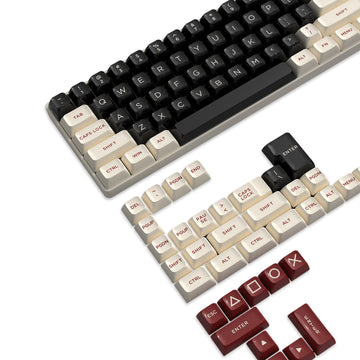
A transparent acrylic keyboard keeps its crystal-clear look when three things line up: the material's optical grade matches its RGB lighting path, you pick acrylic or polycarbonate based on whether scratch resistance or impact resistance matters more, and you clean only disconnected exterior surfaces with a lightly damp, soft cloth. Skip any one of those steps and a bright, even glow can turn into a hazy or scratched-looking case faster than it should.
Key Takeaways
- RGB diffusion depends on the acrylic or polycarbonate grade and whether the lighting is backlit or edge-lit, not on the word "clear" by itself.
- Acrylic generally resists everyday scratching and holds its clarity; polycarbonate generally resists impact better but scratches more easily without a hard coat.
- Dust and fingerprints show up faster on clear surfaces, so lifting particles before wiping and handling the keyboard with clean, dry hands matters more than on an opaque case.
- The safest cleaning method starts with disconnecting the keyboard, removing loose particles, then wiping with a lightly damp, lint-free cloth and lukewarm water.
- Confirm the exact material and any coating in the manual before using anything stronger than water and a mild detergent, and stop experimenting if haze or damage appears.
What Determines RGB Diffusion in a Transparent Keyboard?
RGB diffusion depends on the optical grade of the plastic and the path the LEDs take through it, not on whether the case is labeled acrylic or polycarbonate. Manufacturers produce transparent grades meant to transmit light clearly and translucent or diffusing grades meant to scatter it, and each behaves differently under the same LED.
Backlighting and edge lighting put that difference to work in opposite ways. A translucent, LED-optimized acrylic sheet is built for maximum light transmission and diffusion, which softens a backlit glow and reduces visible hot spots, while a transparent acrylic sheet used for edge lighting is designed to carry light to the surface without scattering it, producing a more directional beam (material grade and lighting path). Polycarbonate follows the same split: optical plastics for lighting and signage come in both light-scattering and light-guiding versions, so the material name alone does not tell you which effect a given keyboard will produce (lighting-grade optical plastics).
That means a "clear" keyboard is not automatically an RGB diffuser. If even, hotspot-free glow matters to you, look for a documented diffusing or backlit-optimized grade rather than assuming transparency guarantees it. Brightness, exact color accuracy, and hotspot behavior still depend on the specific keyboard's construction, which general material data cannot predict.
Acrylic vs. Polycarbonate: Which Tradeoff Fits Your Setup?
Acrylic and polycarbonate trade off scratch resistance against impact resistance, and neither one wins outright. The table below lines up the properties that matter most for a desk keyboard's long-term look.
| Property | Acrylic tendency | Polycarbonate tendency |
|---|---|---|
| Everyday scratching | Generally more resistant | More prone unless coated |
| Impact tolerance | Lower; can crack under strong impact | Much higher impact tolerance |
| Optical clarity | Slightly higher light transmission | Close, slightly lower transmission |
| Coating effect | Less commonly needed | A hard coat measurably improves abrasion resistance |
| Best-fit handling scene | Desk use with careful handling | Drop-prone or heavily flexed use |
Standard acrylic generally resists everyday scratching and keeps a clearer look over time, while standard polycarbonate survives major impacts far better but marks more easily unless it carries a hard coating designed to fight abrasion (acrylic versus polycarbonate tradeoff). These are general, standard-grade patterns; the exact plastic grade and any coating on your specific keyboard can shift the balance in either direction.

If your keyboard mostly sits on a desk and gets handled carefully, prioritize acrylic's scratch resistance and clarity. If it travels, gets bumped, or flexes under heavy typing, polycarbonate's impact tolerance is the safer bet, especially when the manufacturer confirms a scratch-resistant coating.
Why Dust and Fingerprints Stand Out on Clear Keyboards
Dust and fingerprints look worse on a transparent keyboard because there is no opaque surface to hide them. Every smear, oil mark, or loose particle sits in plain sight against the light passing through the case.
Before wiping anything, inspect the surface under normal desk lighting so you don't mistake a light smear for permanent haze. Lift or brush away loose dust first instead of pressing a cloth straight onto it, since grinding particles across the surface is what turns dust into fine scratches. Handle the keyboard with clean, dry hands, and avoid dragging dusty objects across the case or plate.
A cover can reduce how much dust and oil settle on the surface between uses, though it will not eliminate fingerprints once you start typing again. If you want that extra layer of protection when the keyboard sits idle, our keyboard covers collection includes clear options sized for common layouts.
How to Clean a Transparent Keyboard Safely
The safest way to clean a transparent keyboard is a short, disconnected, exterior-only routine that avoids liquid near the electronics. Follow these steps in order.

- Check your keyboard's manual for material, coating, and keycap-removal limits, then disconnect it from power. Never spray liquid directly onto a connected keyboard.
- Remove loose dust and debris first, using light brushing or compressed air rather than pressing a cloth onto the surface.
- Lightly moisten a soft, lint-free cloth with lukewarm water; the cloth should be damp, not dripping.
- Wipe the accessible exterior acrylic gently. A small amount of mild dishwashing detergent is acceptable if the surface needs it and your manual doesn't say otherwise, but skip alcohol, benzene, or other solvents, which can damage acrylic surfaces (cleaning PLEXIGLAS acrylic safely).
- Let the surface dry completely, inspect it for remaining marks, and reconnect power only once it's dry.
Stop wet cleaning immediately if there's any chance moisture could reach switches, ports, or seams; disconnecting first is what prevents that risk. If your keyboard's manual permits keycap removal, that step can happen between steps 2 and 3, but only within the limits it specifies.
Long-Term Care: Preserve Clarity Without Over-Cleaning
Long-term clarity depends more on avoiding abrasive contact and mismatched cleaners than on cleaning often or aggressively. The conservative water-and-soft-cloth method above is the right default for most routine upkeep.
Before reaching for anything stronger, confirm whether your keyboard's clear component has a hard coating, since a verified abrasion-resistant coat can change how much cleaning pressure or chemical exposure the surface can handle (hard-coated polycarbonate can change abrasion behavior). Using a stronger cleaner on an uncoated surface, or skipping verification altogether, is how avoidable haze or scratching happens.
If you notice visible haze, cracking, or coating damage that the conservative method doesn't resolve, stop experimenting and check the manual or contact the manufacturer instead of trying a different chemical. For routine care, the practical next step is simple: identify your keyboard's exposed material and coating in the manual, then use the disconnected, exterior-only cleaning method above.
FAQs
Can a clear acrylic keyboard make RGB look brighter?
Not automatically. Diffusion and brightness are separate outcomes: a translucent, diffusing grade can spread light more evenly, but that changes uniformity, not necessarily brightness or color accuracy. For a specific keyboard, check its documented lighting path rather than assuming transparency alone changes brightness.
Does a hard coating change polycarbonate's scratch resistance?
Yes, a verified hard coat can meaningfully improve polycarbonate's resistance to everyday scratching. Not every polycarbonate keyboard component is coated, though, so confirm the exact part's finish in the product documentation before assuming it matches a coated sample.
Can I use alcohol or window cleaner on a transparent keyboard?
Don't assume it's safe. Alcohol, benzene, and other solvents can damage acrylic surfaces, and compatibility varies further with polycarbonate and any applied coating (avoid assuming alcohol or window cleaner is compatible). Start with the manual and the conservative water-and-soft-cloth method instead, and keep any cleaner away from the electronics.
Is it safe to remove the keycaps for a deeper clean?
It depends on the model. Some keyboards permit keycap removal for deeper cleaning and some don't, so check the manual before attempting it. Always disconnect power first, follow the manual's permitted procedure, and keep liquid away from switches, ports, and openings during the process.