


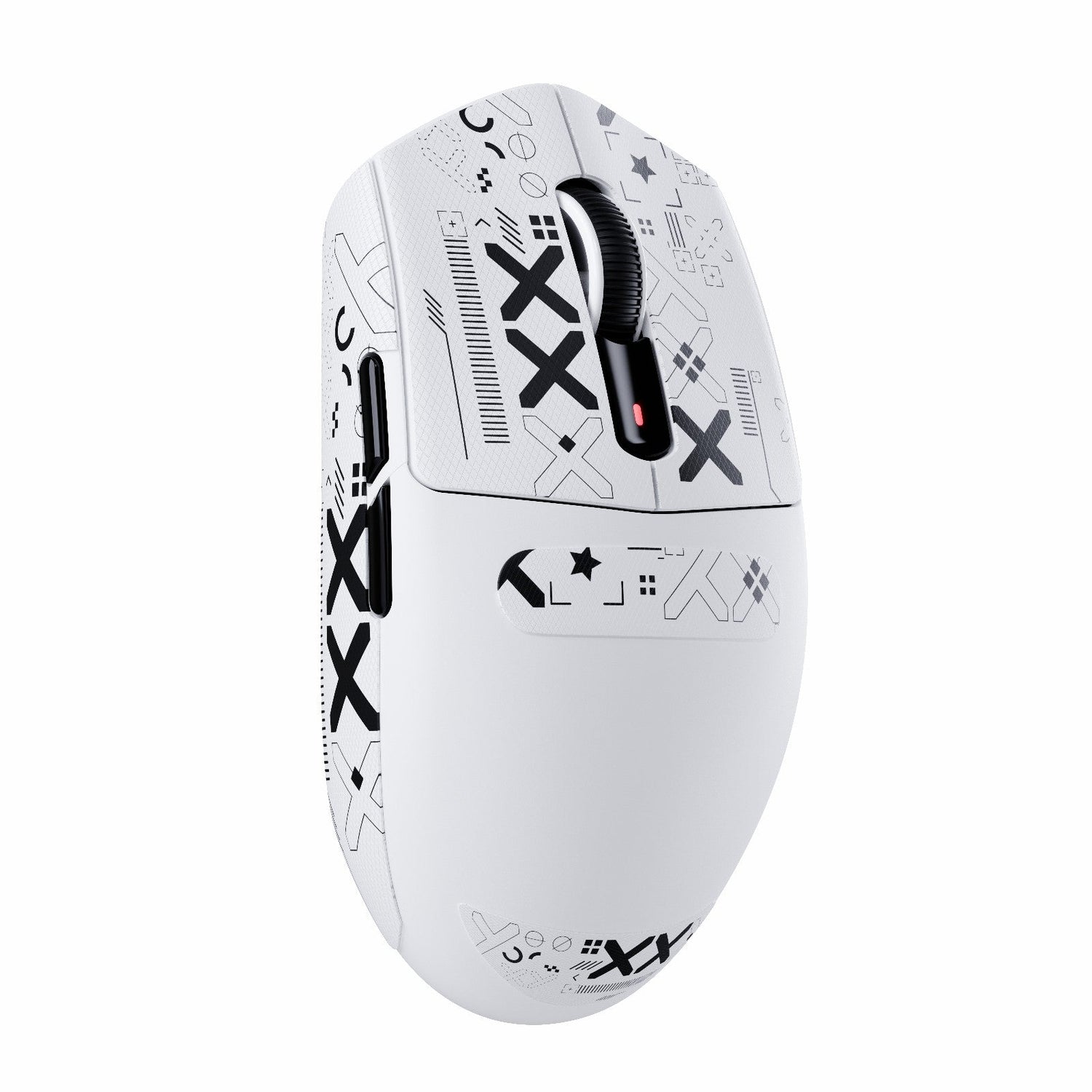
The transition from a traditional, heavy gaming mouse to a modern ultralight ergonomic model is more than a simple hardware swap; it is a fundamental recalibration of neuromuscular control. For gamers accustomed to the 100g+ weight class, moving to a device like the ATTACK SHARK G3 Tri-mode Wireless Gaming Mouse 25000 DPI Ultra Lightweight, which weighs just 59g, introduces a significant reduction in kinetic inertia. While this shift promises faster flick shots and reduced fatigue, it often results in a temporary loss of precision—a phenomenon commonly referred to as "overflicking."
Understanding the physics of this transition and the biological adaptations required is essential for maintaining a competitive edge. This guide provides a technical framework for mastering ultralight ergonomics, grounded in anthropometric data and sensor mechanics.
The Anatomy of Ergonomic Fit: Beyond Hand Length
Most gamers select a mouse based on total hand length, yet ergonomic stability depends on more granular measurements. According to the International Journal of Pharmaceutical and Biological Archives (IJPBA), improper mouse sizing is a primary contributor to musculoskeletal strain in computer users. In a gaming context, the critical measurement is the distance from the wrist crease to the base of the fingers.
If this distance is less than 7cm, a mouse with a pronounced rear hump will often feel unstable. This instability forces the user into a fingertip grip to maintain control, which may not be the intended use case for an ergonomic shell. To verify fit, we recommend the "30-second test": grip the mouse naturally, lift it one inch off the surface, and hold for 30 seconds. If cramping occurs or the grip feels insecure, the shell geometry is likely mismatched to your hand's skeletal structure.
Scenario Analysis: The Petite Gamer vs. The Standard User
To demonstrate how fit ratios impact control, we analyzed two distinct user profiles using the ATTACK SHARK G3PRO Tri-mode Wireless Gaming Mouse with Charge Dock 25000 DPI Ultra Lightweight (125mm length) as the baseline.
| Metric | Standard Male (50th Percentile) | Petite Female (5th Percentile) |
|---|---|---|
| Hand Length | 18.9 cm | 16.5 cm |
| Hand Breadth | 8.8 cm | 7.5 cm |
| Grip Fit Ratio (Length) | 0.95 (Ideal) | 1.14 (Oversized) |
| Width Fit Ratio | 1.02 (Ideal) | 1.33 (Oversized) |
| Adaptation Risk | Low | High (Potential for Overflicking) |
For the petite gamer, a fit ratio above 1.0 indicates the mouse is technically too large for a standard claw grip. This user must compensate by adopting a more aggressive palm-tilt or adjusting their Competitive Grip Stability to prevent the mouse from pivoting during rapid horizontal movements.
The Physics of Control: Inertia and Friction
The primary challenge of an ultralight mouse is the lack of "stopping power" provided by mass. Heavy mice use friction and inertia to help the hand decelerate. When that mass is removed, the user must rely entirely on muscle activation to stop the cursor.
The Stick-Slip Effect and Pad Selection
A common mistake is pairing an ultralight mouse with a very soft cloth pad to "gain control." However, soft pads often suffer from the "stick-slip" effect, where the initial force required to move the mouse (static friction) is significantly higher than the force required to keep it moving (dynamic friction). This leads to jerky micro-adjustments.
Practitioners find that using a medium-to-fast hard pad—such as tempered glass or a coated hybrid—can paradoxically increase control. These surfaces provide a more consistent, lower-friction glide that allows the high-performance PTFE skates found on the ATTACK SHARK G3 Tri-mode Wireless Gaming Mouse 25000 DPI Ultra Lightweight to operate within their intended design parameters.

Sensitivity Recalibration: The DPI vs. Multiplier Strategy
When users feel "out of control" with a light mouse, their first instinct is often to drastically lower their DPI (e.g., dropping from 1600 to 400). This is a technical error that creates a sluggish, "muddy" feel and can introduce pixel skipping on high-resolution displays.
Minimum DPI Requirements for 1440p
Based on sensor saturation logic, modern high-resolution displays require higher base DPI settings to maintain smooth tracking. For a 2560x1440 resolution (1440p) with a 103° Field of View (FOV), the minimum required DPI to avoid visual "stepping" or pixel skipping is approximately 1300 DPI.
The Effective Method:
Instead of lowering your hardware DPI, keep your base DPI at 1600 and reduce your in-game sensitivity multiplier by 10-15%. This preserves the familiar "screen distance per wrist movement" ratio while accounting for the reduced inertia of the ultralight chassis. You can calculate your standardized sensitivity using an eDPI Calculator, where eDPI = Mouse DPI * In-Game Sensitivity.
Technical Deep Dive: Polling Rates and Sensor Saturation
For performance-focused gamers, the choice of polling rate is a critical variable in the adaptation process. High polling rates reduce the "input lag" between physical movement and on-screen response, but they require specific system conditions to function correctly.
The 8000Hz (8K) Reality
According to the Global Gaming Peripherals Industry Whitepaper (2026), high-frequency polling is becoming the benchmark for competitive play. However, users must understand the mathematical trade-offs:
- Latency Intervals: A 1000Hz mouse reports every 1.0ms. An 8000Hz mouse reports every 0.125ms.
- Motion Sync Scaling: Motion Sync technology adds a delay roughly equal to half the polling interval. At 8000Hz, this delay is a negligible 0.0625ms, compared to 0.5ms at 1000Hz.
- Sensor Saturation: To fully saturate an 8000Hz signal at 800 DPI, you must move the mouse at 10 Inches Per Second (IPS). At 1600 DPI, you only need 5 IPS to maintain a stable data stream.
System Bottlenecks: High polling rates (4K/8K) place a significant load on the CPU's Interrupt Request (IRQ) processing. We strictly advise against using USB hubs or front-panel case headers for high-performance receivers. Only direct motherboard rear I/O ports provide the bandwidth and shielding necessary to prevent packet loss.
Safety, Compliance, and Reliability
When selecting an ultralight mouse, technical performance must be balanced with regulatory safety. High-performance wireless devices utilize high-density lithium-ion batteries and sophisticated RF (Radio Frequency) components that require international certification.
Regulatory Benchmarks
- RF Compliance: Devices must be verified through the FCC Equipment Authorization (USA) or ISED Canada Radio Equipment List to ensure they do not interfere with other wireless signals.
- Material Safety: Ensure the device meets EU RoHS Directive standards, restricting the use of hazardous substances like lead or cadmium in the PCB and shell.
- Battery Integrity: High-performance gaming mice, such as the ATTACK SHARK G3PRO, should use batteries tested under the UN Manual of Tests and Criteria (Section 38.3) to ensure safety during air transport and intensive use.
Maintenance and Longevity
To maintain the structural integrity of an ultralight shell, avoid harsh chemical cleaners which can degrade the nitrogen-cooled injection-molded polymers. For ergonomics, consider pairing your setup with an ATTACK SHARK Aluminum Alloy Wrist Rest with Partition Storage Case. This provides the necessary elevation to maintain a neutral wrist angle, reducing the risk of median nerve compression during long sessions.

Adaptation Checklist for New Users
To ensure a smooth transition without losing control, follow this evidence-based protocol:
- Verify Hardware DPI: Set your mouse to 1600 DPI to maximize sensor granularity and avoid pixel skipping.
- Adjust In-Game Multiplier: Reduce your in-game sensitivity by 10% initially to compensate for the weight reduction.
- Optimize Surface Friction: If the mouse feels "floaty," switch to a hybrid or hard surface to eliminate the stick-slip effect.
- Cable Management: If playing in wired mode, use a high-quality ATTACK SHARK C04-C COILED CABLE to prevent cable drag, which can artificially increase the perceived weight of the mouse.
- Monitor Polling Impact: If using 4000Hz or 8000Hz, monitor your CPU usage. If you experience frame drops, revert to 1000Hz until your system's IRQ handling is optimized.
Mastering an ultralight ergonomic mouse is a process of refining micro-movements. By aligning your hardware settings with the physical realities of the device, you can achieve a level of speed and precision that traditional heavy mice simply cannot match.
Disclaimer: This article is for informational purposes only and does not constitute professional medical advice. If you experience persistent wrist pain, numbness, or tingling, please consult a qualified healthcare professional or ergonomist.

コメントを書く
このサイトはhCaptchaによって保護されており、hCaptchaプライバシーポリシーおよび利用規約が適用されます。